
Matomo for SaaS Platforms and Business Applications
This guide explains the tracking considerations for implementing Matomo in applications such as Salesforce, Jira, Microsoft Dynamics, Oracle, ServiceNow, customer portals, intranets, and other web-based business software.
Looking for tracking guidance on applications that your organisation builds and maintains? See Matomo for Product and App Analytics.
Modern organisations rely on many business applications, from cloud-based SaaS platforms and customer portals to internal tools and enterprise software. While many of these environments can be analysed with Matomo, the implementation approach depends on how the application is built and how much access you have to deploy tracking.
Available tracking methods
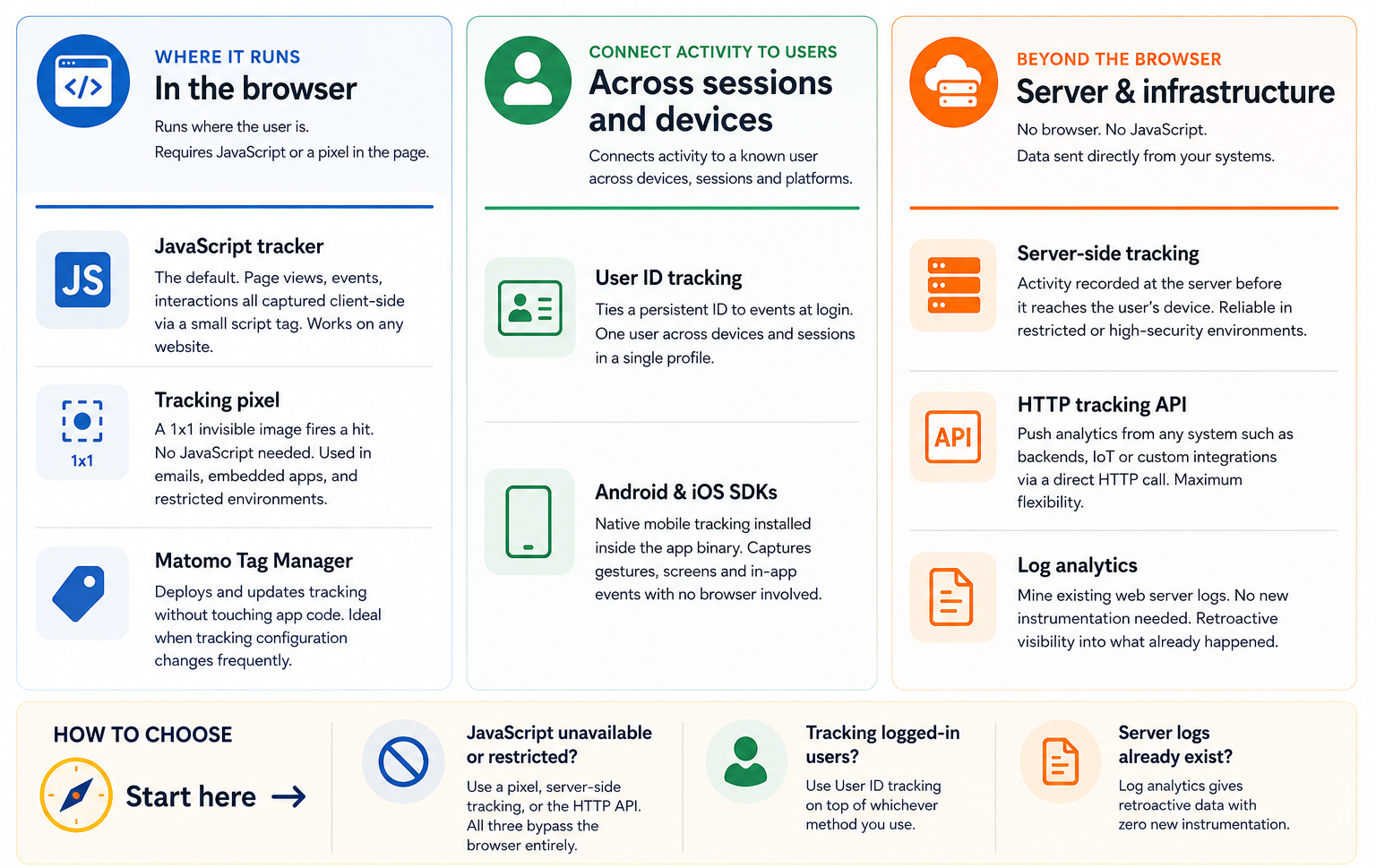
Matomo supports several tracking methods across websites, mobile apps, SaaS platforms, customer portals, and authenticated systems, including:
- JavaScript tracker
- Tracking pixel
- Matomo Tag Manager
- Android & iOS SDKs
- Server-side tracking
- HTTP Tracking API
- Log Analytics
The most suitable approach depends on the application’s architecture and the level of access available for deploying tracking.
How application environments affect tracking
No two business applications are the same. Some let you add Matomo’s tracking code directly, while others require APIs, custom development, reverse proxies, or platform-specific integrations.
In most cases, what you can measure depends less on the application itself and more on how much control you have over its pages, code, and user interface. The following factors usually determine which tracking approach is possible and how much user behaviour you can analyse.
-
Can you add custom JavaScript?
The simplest way to deploy Matomo is by adding the JavaScript tracker or Matomo Tag Manager. Applications that allow custom JavaScript generally support the widest range of analytics, including page views, events, goals, Ecommerce, and User ID tracking. -
Does the application use a Content Security Policy (CSP)?
Many enterprise applications use Content Security Policies to control which scripts can run. You may need to update your CSP before Matomo’s tracker or Tag Manager can load. -
Is it a single-page application (SPA)?
Many modern SaaS platforms update the page without performing a full page reload. These applications usually require additional pageview tracking when the route changes. -
Does it use iframes?
Some applications display content inside iframes. Depending on how the iframe is configured, Matomo may have limited visibility into user interactions across frame boundaries. -
Does the vendor support customisations?
Some software vendors restrict unsupported modifications or injected scripts. Before implementing analytics, consider the impact on vendor support, future upgrades, and long-term maintenance.
Tracking support by platform type
The table below provides general guidance for common application environments. Individual products may support more or less tracking depending on how they are configured and customised.
| Application type | Typical tracking outcome | Maintenance considerations |
|---|---|---|
|
Native JavaScript support Oracle APEX, WordPress, Drupal, Jira Data Center, Shopify Plus |
Direct deployment of the Matomo tracker with support for page views, events, conversions, user journeys, and User ID tracking. | Tracking is usually stable across upgrades and requires little ongoing maintenance. |
|
Platform-specific implementation Salesforce, ServiceNow, Jira Cloud, Dynamics 365, SharePoint Online, Zendesk |
Comprehensive tracking is often possible but may require platform-specific deployment methods, custom events, or SPA tracking. | Platform updates may require periodic changes to custom tracking implementations. |
|
Restricted environments Workday, Microsoft Teams, Okta, SAP SuccessFactors, SAP S/4HANA Cloud |
Analytics often focuses on specific workflows, integrations, or server-side events rather than complete user journeys. | Security controls, vendor policies, or limited customisation options can increase implementation complexity. |
Even when an application limits direct tracking, you can often collect valuable analytics using alternative approaches such as server-side tracking, APIs, custom events, or platform-specific integrations.
The best implementation balances analytics requirements with long-term maintainability. Consider how future platform upgrades, security policies, and vendor support may affect your tracking strategy before deploying customisations.
Next steps
Once you’ve implemented tracking, the next step is understanding how people use your application.
Continue to Matomo for Product and App Analytics to learn how to analyse feature adoption, engagement, retention, funnels, and conversions using the data you collect.