
Persisting Matomo data and plugins in Docker
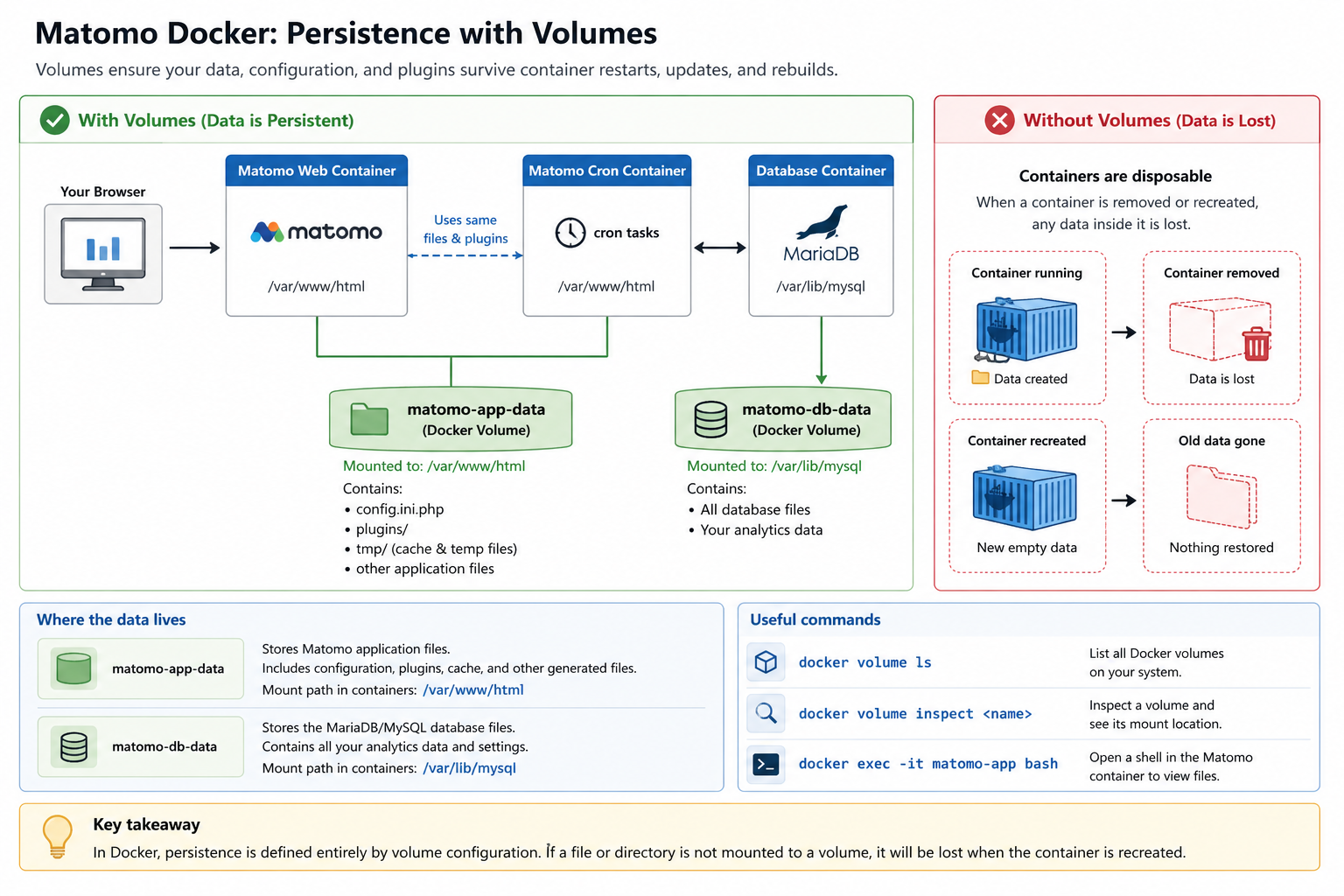
Docker containers are disposable by design. If a container is removed, any data stored inside that container is lost. To prevent data loss, you must use Docker volumes for all parts of Matomo that need to persist across restarts, updates, and container rebuilds.
Required volumes
A standard Matomo Docker setup requires the following volumes:
1. matomo-db-data
Stores the MariaDB or MYSQL database files. Mount path: /var/lib/mysql
Variables such as MYSQL_DATABASE, MYSQL_USER, and MYSQL_PASSWORD are only used when the database volume is first initialised. Changing these values later does not update an existing database volume. To apply new database credentials in a fresh test setup, recreate the volume. Do not do this if the database contains data you need to keep.
2. matomo-app-data
Stores Matomo application files, including configuration, plugins, and generated assets. Mount path: /var/www/html.
Check the volumes:
docker volume ls
What must be persisted
The following data must be persisted in Docker Compose configuration file (docker-compose.yml):
1. Database
The Matomo database stores your analytics data, including visits, actions, goals, Ecommerce data, and report data. Persist it by mounting /var/lib/mysql. For example:
matomo-db-data:/var/lib/mysql
2. Matomo configuration and application files
Matomo stores important files in the application directory, including the Matomo configuration file. The config file is generated during installation (/var/www/html/config/config.ini.php) and contains the database connection details, enabled plugins, and system settings.
Persist the Matomo application directory by mounting /var/www/html. For example:
matomo-app-data:/var/www/html
3. Plugins
Installed plugins are stored in the Matomo application directory (/var/www/html/plugins). If a plugin is installed in the Matomo container but not available in the cron container, archiving tasks may fail or produce incomplete reports.
To prevent this, use shared volumes and mount the same Matomo application volume into both the Matomo container and the cron container. For example, for both containers ensure the cron container can access the same config and installed plugins:
matomo-app-data:/var/www/html
4. Cron and plugin consistency
The cron container must use the same Matomo image and mount the same application volume (/var/www/html) as the main Matomo container. This ensures it has access to the same configuration and installed plugins when running archiving tasks.
If the cron container does not share the same files, plugins may not be detected during archiving, which can result in incomplete or incorrect reports.
5. Logs and generated files
Matomo generates cache files and temporary data under /var/www/html/tmp. These files are included when you persist /var/www/html.
Persistent logs are typically handled by Docker logging, but if required, logs can also be redirected or mounted separately depending on your environment.
Production considerations
In controlled production deployments, create a custom Docker image and use the same image for both the Matomo web container and the cron container.
- Use volumes to persist data and configuration.
- Avoid making manual changes inside running containers.
- Build a custom Docker image for pre-installed plugins and premium plugins (using a valid licence key).
In Docker, persistence is defined entirely by volume configuration. If a file or directory is not mounted to a volume, it will be lost when the container is recreated.
Troubleshooting
The following troubleshooting steps cover persistence and volume configuration issues when running Matomo in Docker.
Plugins disappear after restart or update
Plugins installed via the Matomo UI are stored in /var/www/html/plugins. If this directory is not persisted using a volume, plugins will be lost when the container is recreated.
To resolve this, persist the Matomo application directory /var/www/html.
Custom changes are lost
Changes made inside a running container are not persistent. It is important that files are not modified directly inside the container in production. Use Docker volumes for persistent files or a custom Docker image for system-level changes.
Read the guide on installing Matomo with Docker.