
How do I find the Hits per year using Google Analytics events?
If you use Google Analytics (GA) and Matomo, you may want to compare the GA event count with Matomo hits to better understand reporting and tracking differences or estimate Matomo Cloud usage.
How Google Analytics events compare to Matomo hits and events
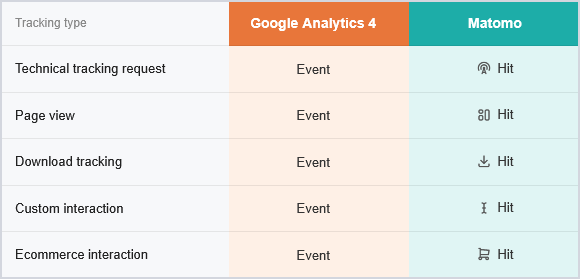
Google Analytics uses an event-based data model where nearly all interactions are recorded as events, including page views, downloads, purchases, and custom interactions.
Matomo uses a different tracking model where a hit is a single interaction sent to Matomo and processed for reporting or analysis. Hits represent raw data points collected by Matomo, regardless of how they are processed or categorised. Hits can include:
- Page views
- Events
- Downloads
- Outlinks
- Site searches
- Content tracking
- Crashes
- and other supported tracking requests.
⚠️ Matomo events are not equivalent to GA4 events.
In many migration scenarios, the GA event count is generally the closest equivalent to Matomo hits when estimating Matomo Cloud usage.
In Matomo, you can reduce unnecessary hit volume before data is processed by using pre-ingestion traffic filtering.
Find the number of hits (events) per month in Google Analytics
- Log in to your GA property.
- Go to Reports > Engagement > Events.
- Select the month date range using the date picker in the top-right corner.
- Review the total Event count displayed in the report.

The total event count for the selected month provides the closest approximation of monthly hits in Matomo.
Because Google Analytics and Matomo use different tracking models, exact numbers may vary depending on how events and interactions are configured in each platform.
If you are moving from GA, read the guide on migrating from Google Analytics to Matomo.