
Matomo AI Brand Insights
Matomo AI Brand Insights lets you monitor how your brand appears in prompt responses generated by different AI providers. You can configure prompts relevant to your industry, products, or services to understand how different AI providers represent your brand. For example, you could ask an AI provider to:
- Recommend products or services in [your] industry.
- Compare leading brands or solutions in [your] market.
- Suggest alternatives to a particular product or service.
Running the same prompts regularly lets you to compare AI-generated responses over time. This helps you identify changes in how your brand and competitors appear in AI-generated responses.
Enable AI Brand Insights
AI Brand Insights is an optional feature available in Matomo Cloud. No data is sent to an AI provider unless you complete your brand profile and enable your prompts.
- To set up your brand profile, go to AI Insights > Brand Insights > Manage.
- Under Brand Profile, enter your brand name and primary website domain. Matomo uses these details to identify your brand in AI-generated responses and recognise citations to your website.
- Add any aliases, such as alternative brand names, product names, or common abbreviations. Matomo uses these to recognise mentions of your brand, even when AI assistants use a different name.
- Under Competitors, add the organisations you want to compare against your brand. Enter each competitor’s name and primary website domain. You can also add aliases to recognise alternative names in AI-generated responses.
- Save your brand details and competitors. You can edit or remove competitors later from the Competitors You’re Tracking table.
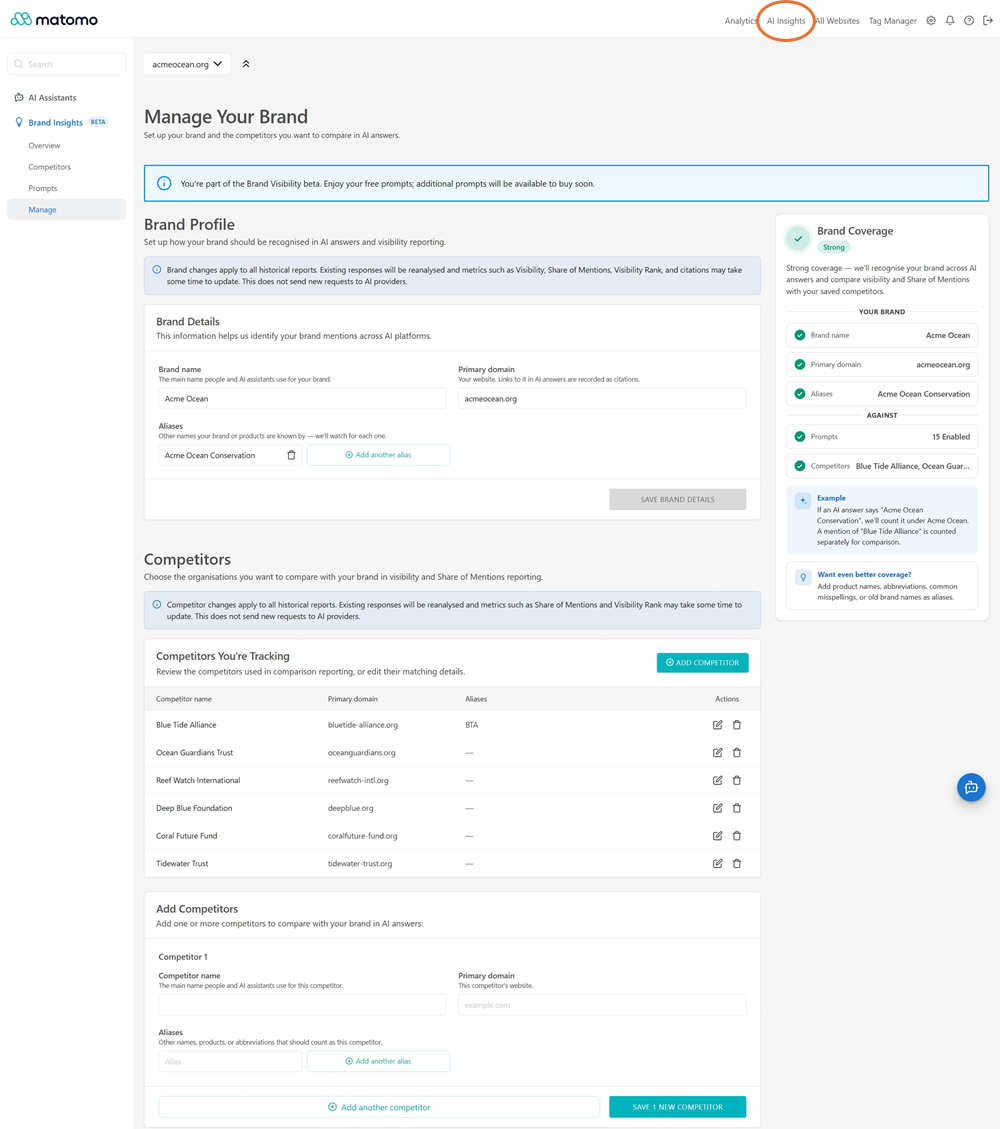
Changes to your brand or competitor details apply to historical reports. Matomo reanalyses existing AI responses to update visibility and comparison metrics without submitting new requests to AI providers.
Add prompts to track brand visibility
To monitor your brand’s visibility in AI-generated responses, you need to create and enable your own tracked prompts. Matomo runs enabled prompts daily, allowing you to monitor how your brand and competitors appear in AI-generated responses.
You can manage these prompts in AI Insights > Brand Insights > Prompts.
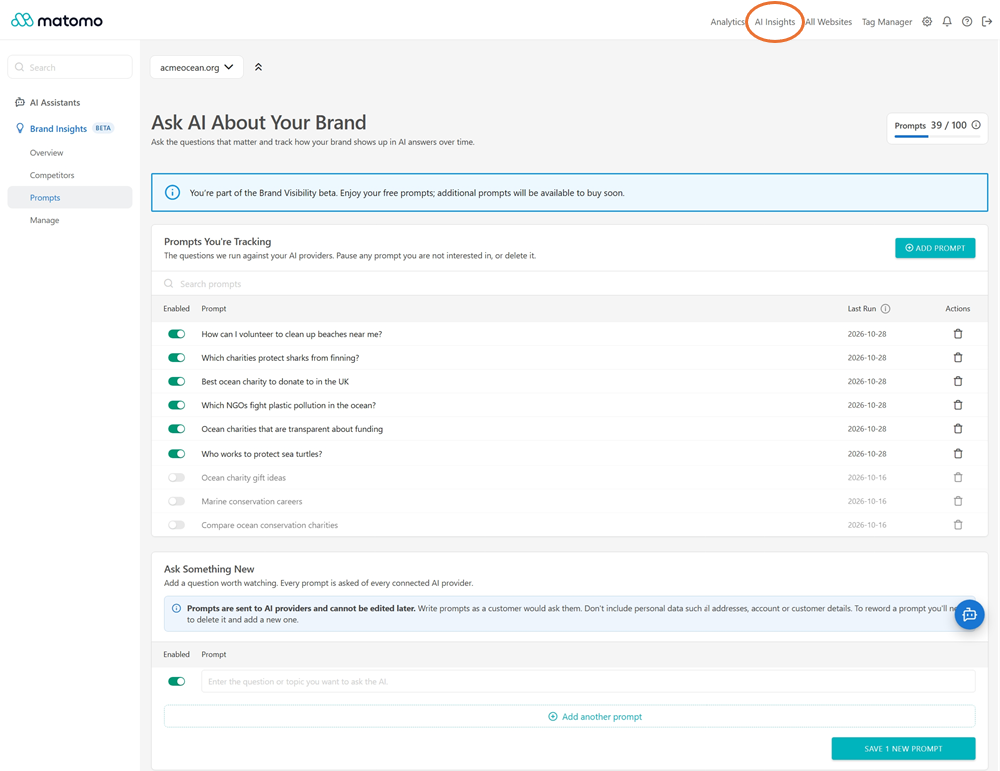
You can manage your prompts using the following options:
- Enable or disable prompts: Use the toggle next to each prompt to control whether it is active and available for use. Disabled prompts are skipped during scheduled runs until you enable them again.
- Add prompts: Users with write access can create custom prompts.
- Search prompts: Use the search bar to quickly find a specific prompt.
- View the last run: Check the Last Run column to see when each prompt was last processed.
- Delete prompts: Remove prompts you no longer want to track. Deleting a prompt also permanently deletes its associated insights and historical results.
Prompt usage and limits
Matomo provides an initial allocation of prompts at no additional cost for eligible subscription tiers. The number of free prompts available depends on your plan.
If you need more prompts than your plan includes, you may be able to purchase additional prompt capacity by contacting Matomo Support.
How AI Brand Insights works
Users with write access in Matomo can configure their brand, competitors, and the prompts used to monitor brand visibility in AI-generated responses.
Each enabled prompt can be run against OpenAI and Google AI Mode, allowing you to see whether your brand appears in AI-generated answers and how its visibility compares with competitors:
- OpenAI: Matomo sends prompts to OpenAI using its AI Providers integration.
- Google AI Mode: Matomo uses DataForSEO, a third-party API provider, to retrieve responses from Google’s AI-powered search experience.
Matomo automatically runs the prompts daily. When a prompt runs:
- Matomo sends the prompt to the service.
- Matomo receives and stores the response returned by the service.
- Matomo analyses the response locally to identify brand visibility signals, including:
- Whether your brand is mentioned.
- Whether your configured competitors are mentioned.
- How prominently your brand or competitors appear in the response.
- Other visibility indicators supported by the feature.
- Matomo updates your AI Brand Insights reports with the results, allowing you to monitor brand visibility and compare performance over time.
Data processed and stored
Matomo stores the information needed to configure AI Brand Insights and report on its results such as your brand, competitor details, prompt configuration, AI provider responses, and the resulting visibility analysis. Brand and competitor information is used locally to analyse provider responses, and it is not sent separately to the AI provider.
Raw responses generated by the AI provider are retained for 365 days and then deleted. Matomo retains the derived visibility analysis and aggregated reports as part of your Matomo analytics data so you can compare visibility over time.
The data-retention and data-use terms that apply while a prompt is processed externally depend on the selected provider or service.
Deleting data
Deleting the site in Matomo permanently removes the AI Brand Insights data stored for that site. Similarly, deleting a prompt permanently removes the AI Brand Insights data associated with that prompt.
Data sent to the AI provider
When a prompt runs, the only data Matomo sends to the selected AI provider or service is the prompt text you configured. AI Brand Insights supports analysis of responses from OpenAI and Google AI Mode.
OpenAI requests use the Matomo AI Providers integration, while Google AI Mode results are retrieved through DataForSEO.
Prompts contain free text. Any brand name, competitor name, personal data, or other information you enter directly into a prompt is sent to the selected AI provider as part of that prompt. If you do not want personal data to be shared with the provider, do not include it in your prompts.
AI Brand Insights does not send the following as part of a prompt request:
- Raw tracking data.
- Aggregated reporting data.
- Visitor-level or personal data from Matomo.
- Website content.
- Your configured brand and competitor details as structured data.
When data is sent to the AI provider
Data is sent to the AI provider only when an enabled prompt runs. Prompts are managed in the Matomo interface and run automatically once per day through a scheduled task. There is no option to run prompts manually.
What the data is used for
The AI provider uses the prompt to generate a text response.
- For Google AI Mode, DataForSEO submits the prompt to Google Search and retrieves the resulting Google-generated response. DataForSEO then returns that response to Matomo.
- For OpenAI, Matomo submits the prompt to OpenAI, which generates a text response and returns it to Matomo for analysis.
Matomo stores the response and analyses it locally, without further AI processing, to determine the visibility signals shown in AI Brand Insights.
Data used for model training
How submitted prompts and generated responses may be used depends on the external service that processes them.
-
For Google AI Mode, the configured prompt is submitted through DataForSEO to Google Search. The prompt and resulting interaction are therefore subject to Google’s applicable terms and data-use practices for its Search and generative AI services, which may include use for service improvement or model training.
-
For OpenAI, Matomo submits the configured prompt through the OpenAI API. By default, OpenAI does not use API inputs or outputs to train or improve its models unless data sharing is explicitly enabled. However, OpenAI may retain prompts and responses for abuse monitoring in accordance with its API data usage policies.
Do not include personal data, confidential information, or other sensitive information in prompts unless you are comfortable with that information being processed under the terms of every external service involved.
AI provider and model
On Matomo Cloud, AI Brand Insights supports OpenAI and DataForSEO in Google AI Mode. The model used for each provider is set by Matomo.
AI use and access controls
AI Brand Insights requires deliberate configuration and does not run prompts on its own by default. Access is controlled through Matomo permissions:
- Users with write access: Configure the brands, competitors, and prompts to be monitored.
- Users with view access: View the AI Brand Insights reports.
Individual prompts can be enabled or disabled. Disabled prompts are not sent to AI providers.
Privacy roles and responsibilities
AI Brand Insights is designed to analyse AI-generated responses based on prompts you configure. It does not send Matomo raw tracking data, aggregated reporting data, visitor-level data or other Matomo instance data to the AI provider.
Because prompts are free text, you are responsible for the information entered into them. Do not include personal data in a prompt if you do not want that information processed by the selected AI provider.
Matomo Cloud
AI Brand Insights is not intended to process personal data or Customer Instance data. Therefore, the Matomo Cloud DPA does not apply to the processing performed through AI Brand Insights.
Things to know
- AI-generated answers are probabilistic rather than deterministic.
- AI Brand Insights reflects the responses observed when your configured prompts are run. It does not provide a complete or deterministic measure of how your brand or competitors will appear across all AI-generated responses.
- Raw AI provider responses are retained for 365 days before deletion.
- Derived visibility analysis and aggregated reports are retained as part of your Matomo analytics data.
Use AI Brand Insights to monitor how your brand appears in AI-generated responses and how its visibility changes over time. By reviewing trends, comparing competitors, and refining your prompts, you can identify opportunities to improve your brand’s visibility in AI-generated answers.