
Ask Matomo
Ask Matomo will be available in November 2026.
Ask Matomo is an optional AI-powered chat feature for signed-in Matomo users. It lets you ask questions about your Matomo reports, analytics data, and configuration using natural language. For example, you can ask:
- What were my top campaigns last week?
- Compare mobile and desktop conversion rates.
- Which goals are configured for this website?
Enable Ask Matomo
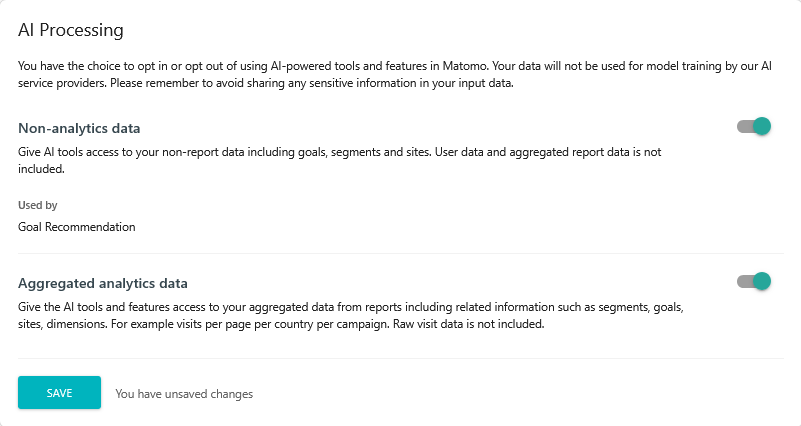
Before using Ask Matomo for the first time, users with superuser access will need to enable it in Matomo to opt-in.
- Log in to Matomo as a superuser and navigate to Administration
 > System > AI Processing.
 - Review the setting before choosing to enable Aggregated analytics data to access aggregated data from reports and related information such as segments, goals, and sites.

- Click Save to apply your settings.
Note: Enabling this feature does not send Matomo data to the AI provider. Data is only sent when, after enabling the feature, a signed-in user submits a prompt or continues an existing Ask Matomo conversation.
1. How Ask Matomo works
The request flow
When a user submits a prompt, Ask Matomo sends the prompt, relevant conversation history, and descriptions of the available Matomo reporting tools to the configured AI provider.
Ask Matomo controls which Matomo tools are available. These tools provide access to supported Matomo reporting data and information, subject to the signed-in user’s existing permissions. Ask Matomo does not give the AI provider general Matomo API access or access to raw visitor-level data in your Matomo instance.
If the AI provider needs information from Matomo to answer the prompt, it can request an available tool. The MCP tool gateway runs the request and retrieves the relevant information from Matomo. This is the technical layer that controls what information Ask Matomo can request and ensures that your existing Matomo permissions are applied.
For example, if you ask a question about campaign performance, Ask Matomo may retrieve aggregated campaign report data. If you ask a question about a Goal, it may retrieve information about that Goal configuration and its associated reporting data.
The retrieved information is then sent to the AI provider through Matomo’s AI provider integration. The provider processes the information and either generates a response or requests additional Matomo tools when more information is needed. This may repeat until the response is complete.
Ask Matomo then displays the final response to the user.
What the AI provider can and cannot do
When explaining how Ask Matomo works, it is useful to distinguish between three different parts that are sometimes all referred to as “the AI”:
- The AI service is the service to which Matomo sends requests. For Matomo Cloud this is Amazon Bedrock, operated by AWS, and it is the only external party that receives data from Ask Matomo.
- The foundation model is the software running inside that service which actually generates the response.
- The model developer is the organisation that originally built and licensed the model. The model developer does not operate Ask Matomo or receive your prompts, retrieved Matomo data or generated responses simply because its model is used within Amazon Bedrock.
Whichever foundation model is configured within Amazon Bedrock, the following holds:
- The model does not remember anything between requests. It holds no profile of you, your site or your previous questions. Everything the model needs must be included in the request itself, which is why Ask Matomo re-sends the relevant conversation history each time. Conversation continuity comes from Matomo’s own storage, not from the model.
- The model cannot independently reach into Matomo. It can only request the use of tools that Matomo makes available to it. Matomo’s MCP tool gateway decides whether to run that request, executes it under the signed-in user’s permissions, and controls what is returned. The model never holds Matomo credentials and cannot query Matomo directly.
- Prompts and responses are not used to train the model. The model’s behaviour is fixed at the point it is deployed, so nothing you send changes it or becomes available to anyone else.
What Ask Matomo can and cannot read
Having permission to view data in Matomo does not by itself make that data available to Ask Matomo. For example, you might have permission to view raw data, but that does not mean Ask Matomo can access it too.
Ask Matomo does not have access to raw visitor-level data including Visits Log data, and there is currently no setting that can enable raw data access for Ask Matomo. It can only access supported aggregated data and other Matomo information that the signed-in user is already authorised to view.
Ask Matomo can access:
- Aggregated reports,
- Site information, such as the site name, domain and time zone,
- Segments,
- Goals, and
- Dimensions.
For example, Ask Matomo could retrieve a report showing that a particular page received 2,000 visits or that a campaign generated 50 Goal conversions.
Ask Matomo cannot make changes in your Matomo instance. It can retrieve and analyse supported information available to the user, but it cannot create, update or delete Matomo data or configurations.
2. Data processed and stored
What is sent to the AI provider
Processing starts when a user submits a prompt. Additional requests may occur when Ask Matomo retrieves information or Matomo continues a multi-step response. Depending on the request, the configured AI provider may receive:
- The user’s prompt and previous conversation messages.
- Instructions provided by Matomo to the AI provider.
- Aggregated reporting data relevant to the user’s request.
- Site, report, segment, dimension, and goal information.
- Page URLs, page titles, and similar labels contained in reports.
- Previous AI responses and information retrieved during the conversation.
The specific data shared depends on the user’s request and the information required to respond. Data sent to the AI provider is limited to the information needed to process the request and relevant conversation context.
Note: Aggregated report data is not automatically free of personal data. Personal data may appear in a prompt, or in page URLs, page titles, custom dimension values, campaign parameters or report labels. A report row or segment covering a very small number of people may also relate to an identifiable individual.
You should therefore not assume that information sent to the AI provider is anonymous simply because Ask Matomo cannot access individual visitor records.
Raw and visitor-level data
Ask Matomo cannot access raw tracking or visitor-level data. Only supported aggregated reporting data and other supported Matomo information are available to Ask Matomo.
What Matomo stores
Ask Matomo stores conversations so users can continue previous interactions.
A conversation includes the information sent and received during that conversation. Matomo may store the following information related to Ask Matomo conversations and AI requests:
- The Matomo user associated with the conversation.
- User prompts and conversation titles.
- AI-generated responses.
- Model reasoning made available by the AI provider. This may be stored for display in Matomo but is not included in the conversation history sent to the AI provider in subsequent requests.
- Information requested from and returned by Matomo tools as part of the conversation, including errors.
- The AI provider and model used to generate each response.
- Technical information about requests, such as token usage, response time, and the reason a response ended.
- Aggregated token usage for billing purposes.
- Where available, user feedback, such as whether an AI response was helpful, may be collected to help improve Ask Matomo.
MCP call logging (Matomo On-Premise only)
If MCP tool call logging is separately enabled, Matomo also writes operational log entries. These include the tool name, outcome, response size, and tool parameters. Parameters are redacted by default. A superuser can explicitly enable full parameter logging. Log retention depends on the configured Matomo logging backend.
Enabling full parameter logging can cause personal data contained in tool parameters to be written to your logs. Enable it only where necessary, and make sure your log retention and access controls account for it.
3. Your AI provider and model
Ask Matomo uses the default AI provider and model configured for the Matomo instance. Individual users cannot select a different provider or model for their conversations.
The way this is configured differs between Matomo Cloud and Matomo On-Premise.
Matomo Cloud
For Matomo Cloud, you do not need to select or configure an AI provider or model. The AI provider, Amazon Bedrock, and the foundation model are configured centrally by Matomo and cannot be changed by users.
Ask Matomo uses Amazon Bedrock operated by AWS as the AI provider, with a foundation model configured to provide the services within the Bedrock environment. In selecting models for Matomo Cloud, Matomo applies the following criteria:
- The model is hosted and run by AWS;
- Where available, Matomo configures Amazon Bedrock to use only approved EU AWS Regions and EU inference profiles whenever the selected model supports them;
- Models that require global or other cross-region inference may process requests in AWS Regions outside the EU;
- The model developer does not receive the prompts, the retrieved Matomo data, or the responses generated through Ask Matomo;
- AWS operates Amazon Bedrock and is the external party that processes Ask Matomo’s AI requests;
- AWS does not use prompts and model outputs to train the underlying models, and this data is not provided to model developers for AI model training; and
- Amazon Bedrock does not retain model inputs and outputs in durable storage by default. Portions of model inputs may be temporarily cached as part of the inference service to improve performance. For certain models, AWS may retain inputs and outputs for up to 30 days for abuse detection. Any retained data remains within AWS and is not shared with the model developer.
The AI provider’s retention is separate from Matomo’s storage of your Ask Matomo conversations. Matomo stores each conversation for up to 30 days after its last update, allowing you to continue the conversation during that period. This storage is within Matomo and is separate from the AI provider’s handling of the request.
The provider and model used for Matomo Cloud may change over time. Any change is subject to privacy and security review before it is activated, covering the model’s licensing and terms, whether the model provider receives any customer data, availability in EU AWS Regions, retention behaviour, and logging. Where a change would introduce a new processing party, Matomo will update its sub-processor list and notify customers in accordance with the applicable DPA.
Matomo On-Premise
A superuser can configure the instance-wide default AI provider and model. Supported providers include:
- Anthropic
- OpenAI
- AWS Bedrock
- An OpenAI-compatible endpoint, which may be hosted or local.
Once configured, Ask Matomo uses the default model configured for the instance. Individual users cannot select a provider or model for each conversation.
If you host an OpenAI-compatible endpoint on your own infrastructure, inference stays within your own environment, and no data is sent to an external AI provider. If you configure an external provider, see On-Premise installations under Roles and responsibilities.
4. Data security and access controls
Ask Matomo provides several controls to manage what data can be used for AI processing and how AI providers can interact with your Matomo instance.
- Users with write access must opt-in to AI processing and they can control which types of Matomo data are permitted for use with AI.
- Users with write access also manage AI provider connections.
- Existing Matomo permissions continue to apply. Users can only access sites, reports, and other data allowed by their Matomo account.
- Requests to the AI provider are encrypted in transit, and access to the provider is restricted using least-privilege credentials.
- Report content such as page URLs and page titles is treated as untrusted input. Ask Matomo applies protections against prompt injection and cannot make changes to Matomo data or its configuration.
- Disabling AI processing for Ask Matomo prevents new AI processing. For Matomo On-Premise, uninstalling the MCP Server plugin also deactivates Ask Matomo.
- Existing Ask Matomo conversations remain stored until manually deleted or automatically removed under the 30-day retention policy.
5. Roles and responsibilities
Matomo processes information required to provide and operate Ask Matomo, including passing requests and relevant Matomo instance data between the user’s Matomo instance and the configured AI provider. The responsibilities differ depending on whether you use Matomo Cloud or Matomo On-Premise.
Matomo Cloud
For Matomo Cloud, where Matomo provides the configured AI service:
- The Matomo customer whose website analytics or app usage data is hosted in the Matomo Cloud instance is the data controller of its visitors’ or app users’ personal data.
- Matomo acts as the customer’s processor for the analytics data held in your Matomo instance.
- The AI provider acts as Matomo’s sub-processor for that processing.
This processing is covered by the Matomo Cloud Data Processing Agreement, or any other DPA currently in place between Matomo and the Matomo Cloud customer.
Matomo separately acts as controller of personal data relating the usage of Matomo Cloud account in accordance with the Matomo Cloud Privacy Policy.
On-Premise installations
If you run Matomo On-Premise and configure your own AI provider or endpoint, you are responsible for that provider relationship. Depending on the data protection laws applicable to you, you should:
- determine the provider’s role and put an appropriate data processing agreement in place (Article 28 GDPR, where applicable);
- review the provider’s terms on training, retention and data sharing;
- assess any international transfers and put the necessary safeguards in place;
- update your own privacy policy and sub-processor disclosures; and
- assess whether a data protection impact assessment or other privacy assessment is required.
6. Things to know when using Ask Matomo
Reliance on outputs
- AI-generated responses are probabilistic and may vary between models or repeated requests.
- Responses may be incomplete or incorrect. Review important information before making decisions based on an Ask Matomo response.
- Do not rely on an AI response as the sole basis for legal, security, employment, financial, or other significant decisions.
- Matomo does not guarantee that responses are accurate, complete or fit for a particular purpose.
Privacy and compliance
- Ensure your use of Ask Matomo complies with your organisation’s privacy policies and applicable data protection and AI regulations. You may need to consult your data protection officer (DPO) or update your privacy policy.
- If you are a controller under the GDPR, reassess whether the legal basis you rely on for collecting analytics data covers this additional AI processing through Ask Matomo.
- Do not enter sensitive or unnecessary personal data into prompts. Only include what is needed to answer your question.
- If the EU AI Act applies to your organisation, do not use Ask Matomo for prohibited AI activities, for example biometric categorisation, or the systematic profiling or evaluation of individuals, including for decisions about employment, education, creditworthiness, or access to essential services.
- You are responsible for deciding whether a data protection impact assessment is required for your use of Ask Matomo (Article 35 GDPR, or a privacy impact assessment under the New Zealand Privacy Act 2020). Matomo will provide the information reasonably necessary to support that assessment.