
AI Chatbots Content Requests reports
From Matomo 5.12.0, the AI Chatbots Content Requests report provides five reports that reveal which content AI chatbots request from your website, such as pages, documents, presentations, and other supported file types. The table reports also identify pages favoured by AI chatbots and human visitors as well as content that could not be retrieved due to errors.
This guide explains how to analyse the AI Chatbots Content Requests reports after AI Chatbot tracking has been configured.
Before you start
The content requests reports are available after configuring AI Chatbot Tracking in Matomo. For setup instructions, configure AI Chatbot Tracking using one of the supported integrations:
- Cloudflare
- Amazon CloudFront
- WordPress
- HTTP Tracking API (custom integration)
Analyse AI chatbot content requests
These reports only include requests from AI chatbots supported by Matomo’s AI Chatbot Tracking feature. Content visibility reflects requests observed by Matomo and does not indicate how AI systems ultimately use, interpret, or present that content.
In Matomo, navigate to AI Assistants > AI Chatbots Content Requests.
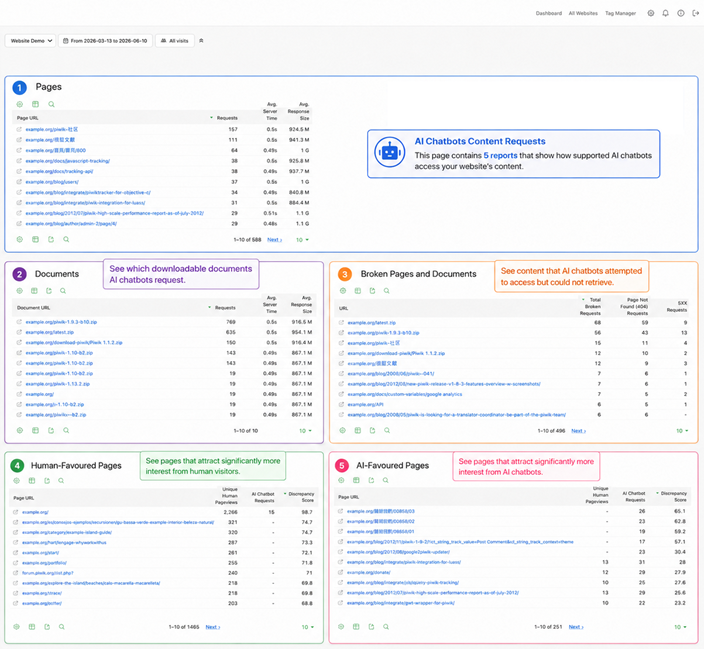
The following reports are available:
- Pages: Lists pages frequently retrieved and referenced by AI systems to identify content with strong visibility in AI-assisted experiences.
- Documents: Shows all downloadable files requested by AI chatbots to understand non-page content consumed by AI systems. This can indicate documents that may be influential in AI-generated responses.
- Broken Pages and Documents: Detect broken links and inaccessible resources that AI chatbots attempted to access but returned an error, such as page-not-found (404) or server (5xx) responses.
- Human-Favoured Pages: Shows pages that receive significantly more human engagement than AI chatbot activity and includes a Discrepancy Score.
- AI-Favoured Pages: Shows pages that receive significantly more AI chatbot activity than human engagement and includes a Discrepancy Score.
Note: Page-based reports are available only in a flat, non-hierarchical view. URL grouping and hierarchical navigation will be added in a future release.
Pages and Documents report
The two different reports shows Pages and Documents separately. The reports refer to content requested by AI chatbots to analyse which AI assistants and chatbots access your pages and documents most frequently.

The report includes the page URL, number of requests, the average server time and response size for each request page and document.
- The Average Server Time shows the average time your server takes to respond to AI chatbot content requests. Higher values may indicate performance issues that could affect how efficiently AI chatbots retrieve content from your website.
- A spike in Average Response Size could correlate with slower server times, failed requests, or unusually large downloadable documents.
Broken Pages and Documents report
This report helps identify inaccessible content, broken links, and potential issues that affect how AI systems access and reference your website content.

The report includes the URL, number of broken requests, Page Not Found (404) Requests, and server error 5XX Requests.
- Review the Page Not Found (404) Requests to determine whether the content has been moved, deleted, renamed, or linked incorrectly. It is recommended to restore important content, update links, or create redirects where appropriate.
- 5XX Requests indicate that AI chatbots are encountering more inaccessible content. Analyse the affected URLs and error types to determine whether the content is unavailable because of a server issue (
5XX), such as an application error, temporary outage, or backend service failure.
Human-Favoured and AI-Favoured Pages
The Human-Favoured Pages and AI-Favoured Pages reports highlight pages that attract significantly different levels of interest between human visitors and AI chatbots.
Each report includes a Discrepancy Score, which measures the difference between human pageviews and AI chatbot requests for a page.
Understanding the Discrepancy Score
The score combines audience imbalance and traffic volume to help identify the most significant differences. Pages with higher scores have a larger difference between human and AI interest and represent the strongest signals in the report. Low scores often indicate balanced audience behaviour, low traffic, or both.

The score determines which pages are Human-Favoured from more human engagement versus AI-Favoured pages that receive more AI chatbot requests than human engagement.
The Discrepancy Score identifies pages where human visitors and AI assistants behave differently. It considers both the size of the difference between audiences and the amount of traffic a page receives.
How to compare reports
Analysing both reports can identify content that performs differently for humans and AI systems, which may inform content optimisation, navigation, and information architecture decisions.

- Look for pages with high Discrepancy Scores. These pages show the largest differences between human and AI chatbot interest.
- Review Human-Favoured Pages to identify content that attracts strong visitor engagement but receives relatively little AI chatbot attention. Do the same analysis for the AI-Favoured Pages that AI chatbots request frequently.
- Investigate whether AI-Favoured Pages contain reference material, documentation, FAQs, or other structured content that may be valuable for both AI systems and human visitors.
- Use the reports alongside your other analytics data to determine whether content should be updated, expanded, reorganised, or made easier to discover.
Next steps
The AI Chatbots Content Requests reports focus on the specific pages and documents AI chatbots access. To analyse broader AI chatbot activity, explore the other reports in the AI Assistants section:
- AI Chatbots Overview for overall chatbot activity.
- AI Chatbots Over Time for long-term trends.
- See other AI Agent and AI Assistant related reports.